 Lekhani
Kannada typing software, made for today
ಲೇಖನಿ — ಇಂದಿನ ಕಾಲಕ್ಕೆ ಕನ್ನಡ ಟೈಪಿಂಗ್
Type Kannada directly in Word, Excel, Tally, your browser — any Windows program. Phonetic and Nudi (KGP) keyboards, in Unicode or Nudi fonts.
Everything you need to type Kannada
A real Windows keyboard, not a separate editor — so Kannada works wherever you type.
Works in every program
Word, Excel, Tally, Chrome, Edge, WhatsApp Desktop, Notepad, Windows search.
Phonetic typing
Type as you speak, Baraha-style: kannaDa → ಕನ್ನಡ. Easy for beginners.
Nudi (KGP) keyboard
The government-standard layout typists already know, with letters appearing on each key press.
Unicode or Nudi fonts
Unicode for the web, WhatsApp and new files; Nudi ANSI for old Nudi documents in Word.
One key to switch
Press F12 to switch between Kannada and English in every program at once.
Private and offline
Typing happens on your computer. Nothing you type is ever sent anywhere. Kannada fonts included.
Install in about two minutes
Internet is needed only for the download. Lekhani types without internet.
Download the installer
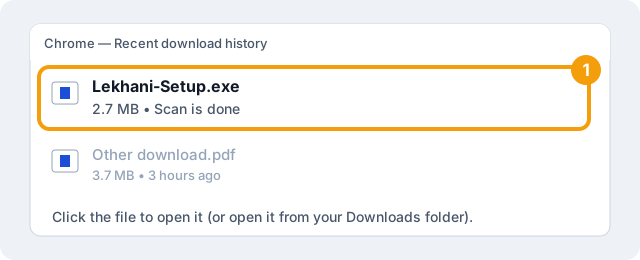
Click Download at the top of this page. Chrome checks the file and shows “Scan is done” in its download list; then click the file to open it.
If your browser ever shows a warning instead, choose Keep or Download from the menu next to the file — a file downloaded from this page is safe.
Open the file
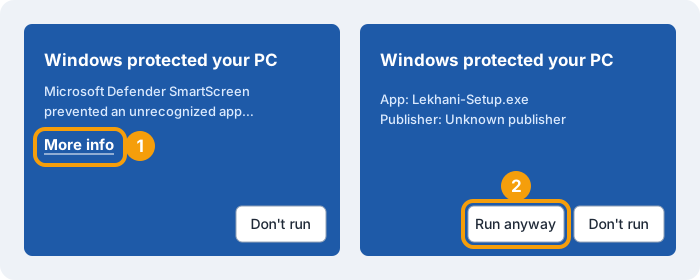
Open Lekhani-Setup.exe. If Windows shows “Windows protected your PC”, click
More info, then Run anyway.
Allow the installer
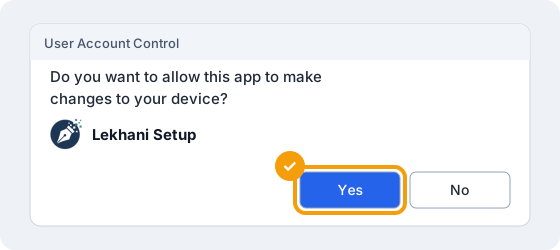
When Windows asks “Do you want to allow this app to make changes?”, click Yes.
Choose options
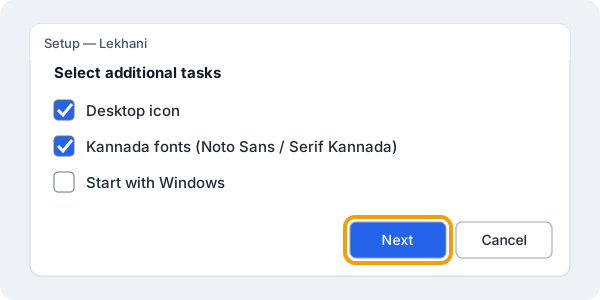
Keep the defaults — desktop icon and Kannada fonts — and click Next, then Install.
Finish
Click Finish. Lekhani turns on, and a Lekhani icon appears on your desktop and next to the clock.
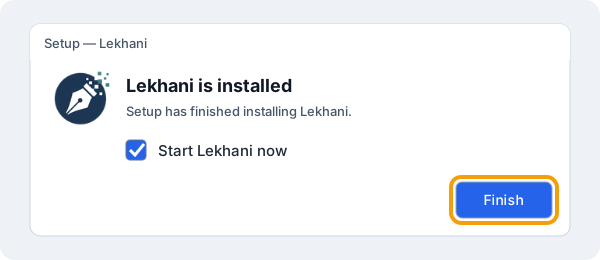
After installing (or updating), close and reopen programs that were already open — Word, Excel, Chrome — or restart the computer once.
Start typing Kannada
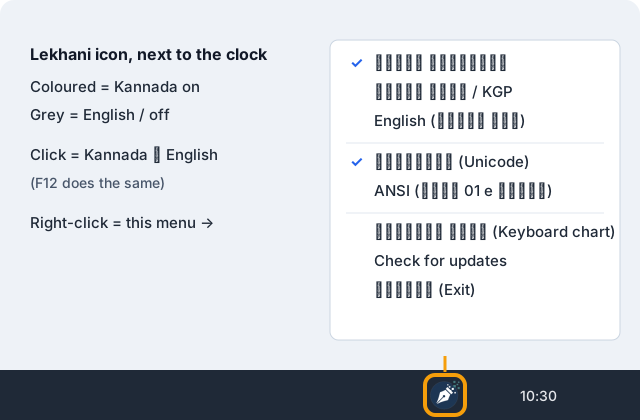
Click the Lekhani icon on your desktop to turn Kannada on. Use the icon next to the clock to control it.
Turning it on and off
- Desktop or Start menu → Lekhani turns Kannada typing on.
- Next to the clock (or under the ^ arrow): coloured icon = Kannada, grey = English.
- F12 or a click on the icon switches Kannada ⇄ English.
- Right-click the icon to choose Phonetic or Nudi (KGP), Unicode or ANSI.
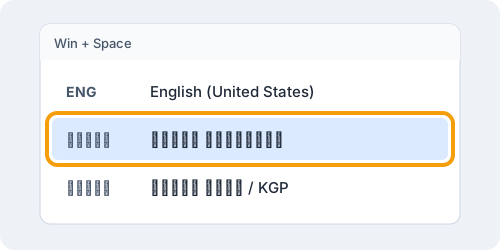
- Win + Space also lists the Lekhani keyboards.
While Lekhani is on, F12 in Word does not open Save As; use the File menu instead.
Phonetic (Baraha-style)
Type the sound in English letters. The word completes when you press Space.
| Type | Get | Type | Get |
|---|---|---|---|
ka | ಕ | kA | ಕಾ |
ki | ಕಿ | kI | ಕೀ |
Na | ಣ | La | ಳ |
kannaDa | ಕನ್ನಡ | namaskAra | ನಮಸ್ಕಾರ |
vidyArthigaLu | ವಿದ್ಯಾರ್ಥಿಗಳು | karnATaka | ಕರ್ನಾಟಕ |
Nudi (KGP)
The same layout as Nudi. f is the halant (್).
| Type | Get |
|---|---|
knfnw | ಕನ್ನಡ |
krfnAqk | ಕರ್ನಾಟಕ |
kRxfN | ಕೃಷ್ಣ |
Unicode or ANSI (Nudi fonts)
- Unicode (default): for WhatsApp, Gmail, websites and new documents. Looks right in any Kannada font — Noto Sans Kannada, Tunga, Nirmala UI.
- ANSI: for old Nudi documents. Right-click the tray icon → ANSI (ನುಡಿ 01 e ಫಾಂಟ್), then set the font in Word to Nudi 01 e.
ANSI needs the Nudi font on your computer (it is there if Nudi is installed). Without it, text looks
like PÀ£ÀßqÀ; choosing the Nudi 01 e font turns it into ಕನ್ನಡ.
Questions
Is Lekhani free?
Yes. This version of Lekhani is free to download and use.
Windows says “Windows protected your PC”. Is it safe?
Yes. Windows shows this for new programs that few people have installed yet; click More info, then Run anyway. Download Lekhani only from this page (lekhani.anvnextech.co.in); the SHA-256 number below the Download button lets you check the file.
How do I get new versions?
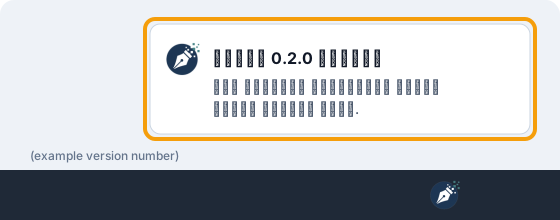
When a new version is out, a notice appears next to the clock — click it to open this page and install the new version over the old one. You can also right-click the tray icon → Check for updates. If a version ever has a serious bug, it stops typing and asks you to update; your files are never affected.
Does Lekhani need the internet?
No. It only checks this website for the latest version number. What you type stays on your computer.
How do I uninstall it?
Settings → Apps → Installed apps → Lekhani → Uninstall. The Kannada fonts stay, so documents typed in them still look right.
Need help?
Tell us which program, what you typed and what appeared — a screenshot helps. ಕನ್ನಡದಲ್ಲೂ ಸಂಪರ್ಕಿಸಬಹುದು.